
The Build Process
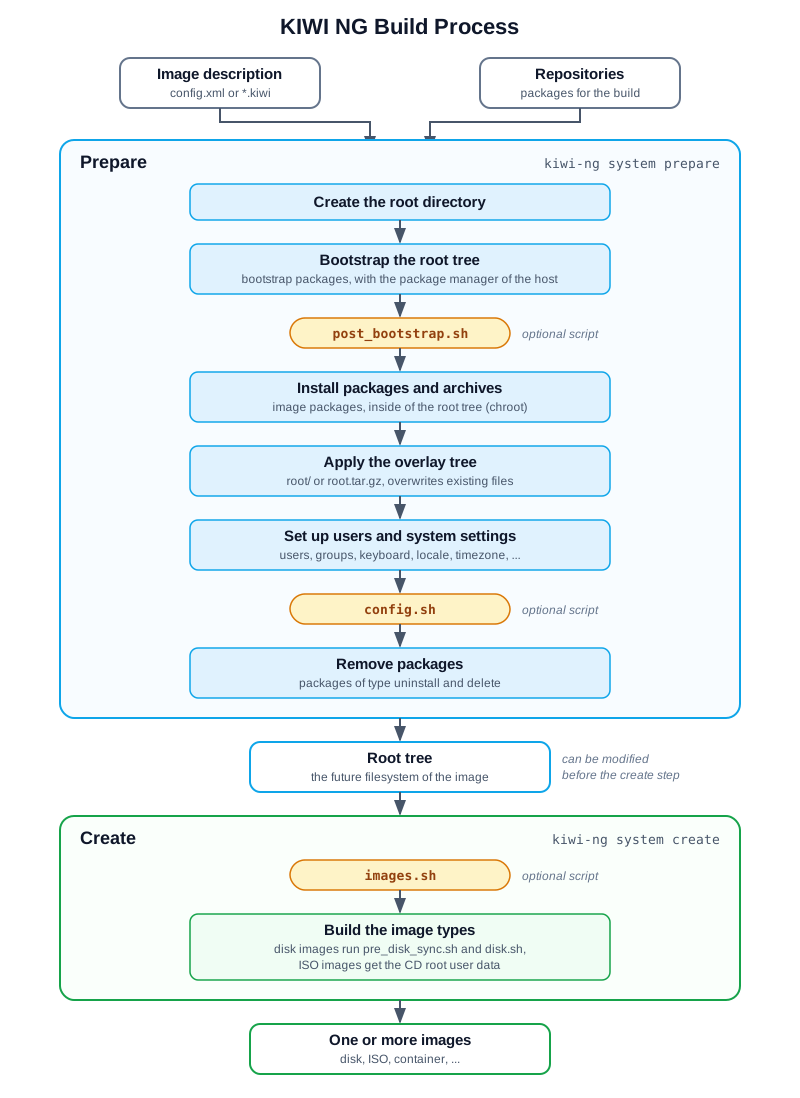
The prepare and the create step, with the optional scripts.
- Diagram description:
The image description and the repositories feed the prepare step. The prepare step creates the root directory, bootstraps the root tree, runs
post_bootstrap.sh, installs the packages and archives, applies the overlay tree, sets up users and system settings, runsconfig.shand removes packages. The result is the root tree. The create step runsimages.shand builds the image types, which run further scripts for disk images and add the CD root user data to ISO images. The result is one or more images.
The command kiwi-ng system build runs both steps in one call. They can
also be called separately with kiwi-ng system prepare and
kiwi-ng system create.
The Prepare Step
The prepare step creates the root tree, also called the unpacked
image tree: a directory which contains the future filesystem of the
image. The packages are installed with the package manager set in the
packagemanager element: apk, apt, dnf4 (default), dnf5,
microdnf, pacman or zypper.
- Create the root directory
KIWI NG stops with an error if the root directory already exists, to not delete an existing root tree by accident. The option
--allow-existing-rootcontinues with the existing root tree.- Bootstrap the root tree
KIWI NG sets up the repositories from the image description and the command line. Then it installs the packages of the
<packages type="bootstrap">section with the package manager of the build host, outside of the root tree. Usually the packagesfilesystemandglibc-localeare enough, their dependencies provide everything needed for the next step. Afterwardspost_bootstrap.shruns, if present.- Install packages and archives
All other packages are installed with the package manager inside of the root tree (chroot), followed by the archives from the
archiveelements, see Packages.- Apply the overlay tree
The content of the overlay tree,
root/orroot.tar.gz, is copied into the root tree. Existing files, for example files installed by packages or archives, are overwritten.- Set up users and system settings
KIWI NG creates the groups and users, see Users, and sets up the keyboard, locale, timezone and further system settings from the image description.
- Run config.sh
config.shruns in the root tree to complete the system configuration, if present. See Scripts.- Remove packages
The packages of the
<packages type="uninstall">and<packages type="delete">sections are removed, see Removing Packages.
The root tree also contains the directory /image with data
KIWI NG needs in the create step, including a copy of the image
description.
Modifying the Root Tree
The root tree is a plain directory. It can be modified with the
standard tools, or by changing into it with chroot, for example to
call the package manager. To do so, run the two steps separately:
$ sudo kiwi-ng system prepare --description <description> --root <root>
$ # modify the root tree in <root>
$ sudo kiwi-ng system create --root <root> --target-dir <target>
Warning
Manual changes are lost with the next prepare step
Changes made by hand are not part of the image description and are lost if the prepare step runs again. Apply changes which should persist in the image description instead.
The Create Step
The create step builds one or more images from the root tree. Several image types can be built from the same root tree, for example a disk image for a virtual machine and an install ISO, if all of them are defined in the image description.
- Run images.sh
images.shruns in the root tree first, if present. It is used for changes which only apply to the image being built, see Scripts.- Build the image types
KIWI NG builds the image in the format of the image type. For disk images,
pre_disk_sync.shanddisk.shrun during this step, if present. For live and install ISO images, the CD root user data is added to the ISO media. For the available image types, see Image Types.