Building with kiwi-boxbuild
Note
Abstract
This document describes the kiwi-boxbuild command. Like the
KIWI NG boxbuild command described in Building in a Self-Contained Environment,
it builds an image in a self-contained virtual machine, called
a box, but requires nothing else than podman on the build host.
Overview
The kiwi-boxbuild command pulls a small runtime container and calls
the kiwi-ng system boxbuild command inside of it. The build itself
happens in a box as described in Building in a Self-Contained Environment, which is
started from within the runtime container.
In contrast to calling kiwi-ng system boxbuild directly, there is
only the need for podman on the build host. The main KIWI NG
requirements as well as the kiwi-systemdeps-boxbuild requirements,
like QEMU, are already provided by the runtime container. Neither
KIWI NG nor its dependencies have to be installed on the build host.
This makes kiwi-boxbuild useful on host system distributions for
which no KIWI NG packages exist, or to keep the build host free from
the KIWI NG tool chain.
Requirements
The kiwi-boxbuild command is provided by the kiwi-boxbuild
package. Add the KIWI NG repo from the Open Build Service. For details,
see Installation from OBS. The package only requires podman:
$ sudo zypper in kiwi-boxbuild
The box is a KVM based virtual machine started from within the runtime
container. Therefore, the runtime container runs as a privileged
container, and the calling user needs access to the KVM device
/dev/kvm on the build host. For building as a non-root user,
a rootless podman setup for this user is required.
Building with the kiwi-boxbuild command
The kiwi-boxbuild command is called in the same way as the
kiwi-ng system boxbuild command. The KIWI NG global options --profile,
--type, --kiwi-file and --debug are accepted directly by
kiwi-boxbuild, as these are passed along to the build in the box.
As with the boxbuild command, everything after the kiwi subcommand,
or the -- separator, is passed along to the build command running
in the box. The following example builds the same image as the
boxbuild example from Building in a Self-Contained Environment:
$ git clone https://github.com/OSInside/kiwi-descriptions.git

$ kiwi-boxbuild --profile Virtual --box leap kiwi \
      --description kiwi-descriptions/suse/x86_64/suse-leap-15.6 \
      --target-dir /tmp/myimage
The available boxes are listed with:
$ kiwi-boxbuild --list-boxes

Available boxes, select one with: kiwi-boxbuild --box NAME

  NAME        ARCHITECTURES                    MEMORY  CPUS  CONSOLE
  tumbleweed  x86_64, aarch64, s390x           8096M   4     hvc0
  leap        x86_64                           8096M   4     hvc0
  fedora      x86_64                           8096M   4     hvc0
  ubuntu      x86_64, aarch64                  8096M   4     hvc0
  universal   x86_64, aarch64, s390x, ppc64le  8096M   4     hvc0
The list is read from the boxbuild --list-boxes output in the runtime
container. As the runtime container only provides QEMU for the host
architecture, a box is only usable if it is provided for the host
architecture. Boxes which are not provided for it are named below the
list.
When called, kiwi-boxbuild performs the following steps:
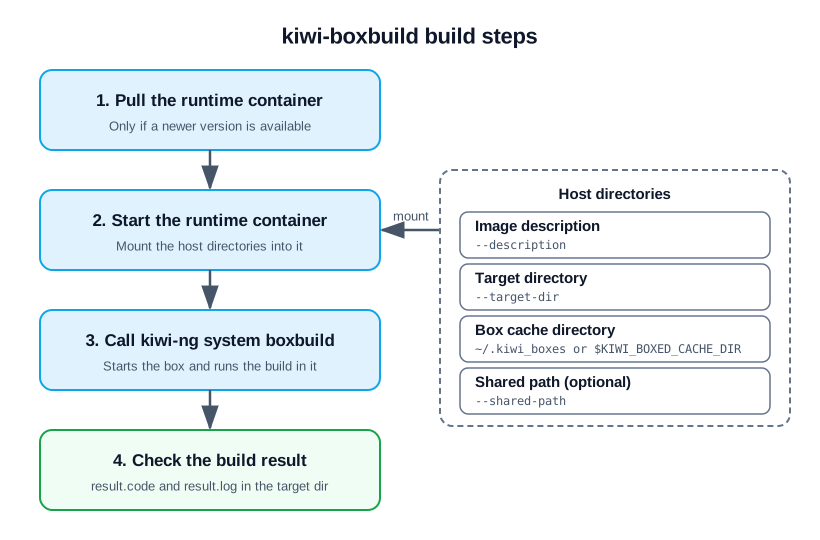
The steps performed by kiwi-boxbuild.
Note
As with the boxbuild command, only the image description, the
target directory and the optional shared path are shared with
the box. No other data will be shared with the host.
Supported boxbuild options
kiwi-boxbuild provides the options of the boxbuild command which
apply to a box started from within the runtime container. For
a description of the options, see kiwi-ng system boxbuild or
call kiwi-boxbuild --help.
The following options of the boxbuild command are not provided by
kiwi-boxbuild, as they are not expected to work in the runtime
container:
--containerThe runtime container does not provide
podmanto run the box as a container.kiwi-boxbuildalways builds in a virtual machine.--sshfs-sharing,--ssh-key,--ssh-portThe runtime container does not provide
sshfs, and the box cannot connect to the build host through SSH.--9p-sharingThe
9pbackend is used by default, if--virtiofs-sharingis not specified.--x86_64,--aarch64The runtime container only provides QEMU for the architecture of the build host.
kiwi-boxbuildalways selects the box for the host architecture.
Using a custom boxes configuration
The available boxes and their download locations are defined in the
boxes configuration file kiwi_boxed_plugin.yml, see
kiwi-ng system boxbuild. By default, the boxes configuration
provided with KIWI NG in the runtime container is used. With
--boxbuild-config FILE, the given host file is used instead. It is
shared read-only with the runtime container as
/etc/kiwi_boxed_plugin.yml, for building as well as for
listing the boxes:
$ kiwi-boxbuild --boxbuild-config my_boxes.yml --list-boxes

$ kiwi-boxbuild --boxbuild-config my_boxes.yml --box mybox kiwi \
      --description kiwi-descriptions/suse/x86_64/suse-leap-15.6 \
      --target-dir /tmp/myimage
Configuring the runtime container
By default, kiwi-boxbuild uses the following runtime container:
registry.opensuse.org/virtualization/appliances/selfcontained/runtime/images/boxbuild:latest
A different runtime container can be configured in the boxbuild
section of the KIWI NG runtime configuration file kiwi.yml:
boxbuild:
  runtime_container: registry.example.com/my/boxbuild:latest
The runtime configuration files are read in the same order as KIWI NG reads them, and a setting in a later file takes precedence:
/usr/share/kiwi/kiwi.ymland the*.ymlfiles in/usr/share/kiwi/kiwi.yml.d/etc/kiwi.ymland the*.ymlfiles in/etc/kiwi.yml.d~/.config/kiwi/config.ymlThe file given with the
--configoption ofkiwi-boxbuild
The runtime container is expected to provide kiwi-ng as its entry
point, along with the requirements of the boxbuild command.