1. Introduction
Hint
Abstract
This chapter explains what Flake Pilot does, which components it is made of and which problems it is designed to solve.
1.1. What Is Flake Pilot
Flake Pilot is software to register, provision, and launch applications that are actually provided inside a runtime environment like an OCI container, a Firecracker VM or a bubblewrap sandbox.
The user of such an application does not have to know this. The application is called by its path like any other program, it receives the arguments given on the command line and it uses the data of the calling user. What happens in between, pulling an image, creating an instance, layering a delta on top of a base, connecting a virtual machine to the network, is the job of Flake Pilot.
The term flake is the short name for an application which runs inside an isolated environment. Registering an application as a flake means to create two things:
A symbolic link at the path of the application which points to the launcher binary of the engine that provides it
A configuration file in the flake registry which describes the image, the target program inside of it and the options to run it with
1.2. Components
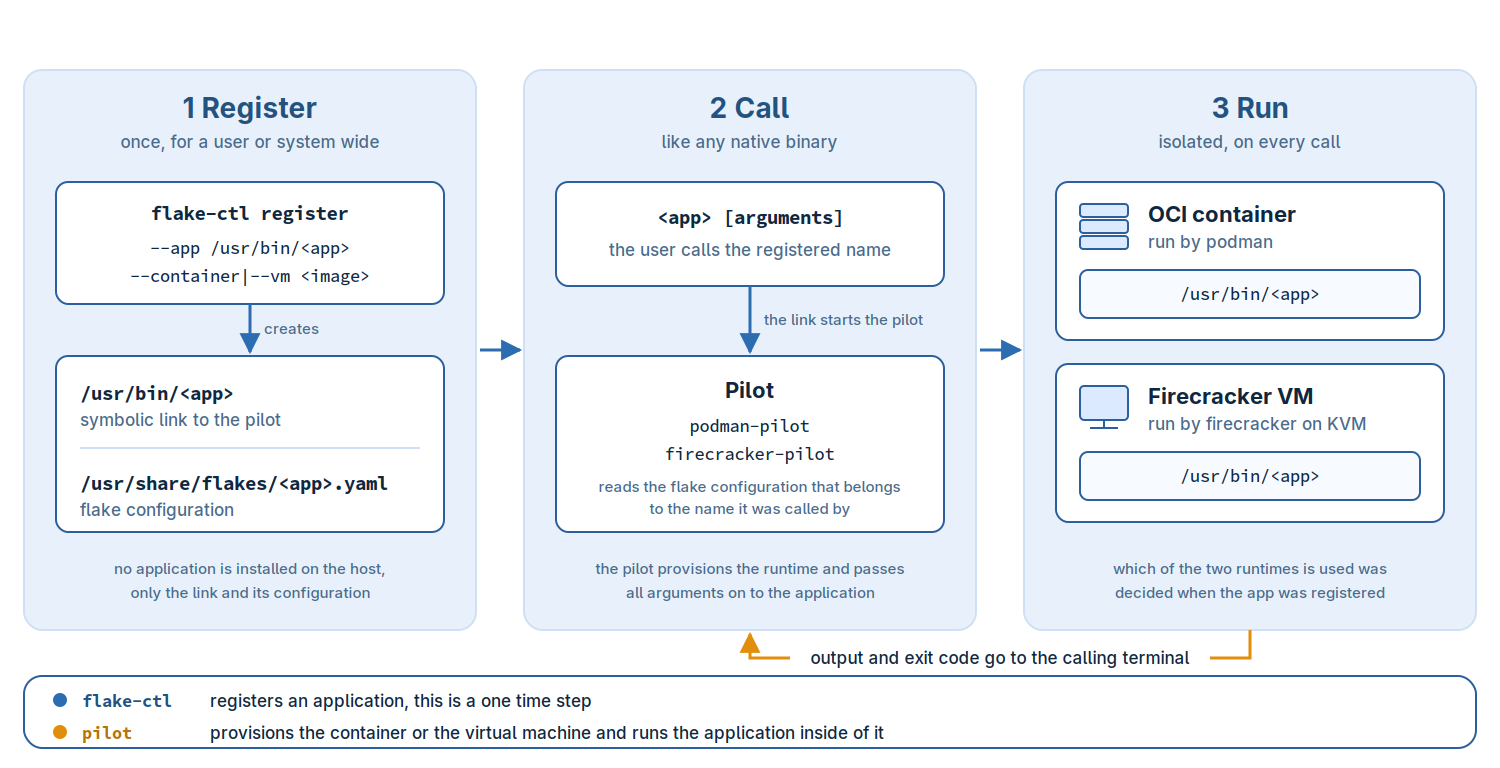
There are two main components:
1.2.1. The Launchers
The launcher binary. Each application that was registered as a flake
is redirected to a launcher binary. As of today, support for the
podman, firecracker and bubblewrap engines are implemented,
leading to the respective podman-pilot, firecracker-pilot and
bubblewrap-pilot launcher binaries.
A launcher, also called a pilot, reads the flake configuration that belongs to the name it was called with, provisions the instance and runs the target program inside of it. Standard input, standard output and the exit code are passed through, which is what makes the call feel native.
1.2.2. The Flake Registration Tool
flake-ctl is the management utility to list, register, remove,
and more… flake applications on your host. It provides one
subcommand per engine, e.g flake-ctl podman,
flake-ctl firecracker and flake-ctl bubblewrap, plus the
commands which are common to all engines like flake-ctl list.
1.3. Use Cases
Running AI workloads in isolated environments.
Delta containers used together with a base container such that only small delta containers are pulled to the registry, used with a base that exists only once.
Layering of several containers, e.g deltas on top of a base. Building a solution stack, e.g base + python + python-app.
Provisioning app dependencies from the host instead of providing them in the container, e.g a delta container providing the app using a base container but taking the certificates or other sensitive information from the host; a three-way dependency model.
Isolating applications that require different library versions than those the host provides, e.g old legacy applications.
and maybe more…
1.4. Choosing an Engine
All engines provide isolation, but on a different level and at a different price:
podmanContainer based isolation. The application shares the kernel of the host, starts fast and has direct access to the resources you hand to it. This is the right choice for most applications, see Applications From a Container.
firecrackerVirtual machine based isolation. The application runs on its own kernel inside a microVM, which separates it from the host much more strictly at the cost of a boot and of an explicit network setup, see Applications From a Virtual Machine.
bubblewrapSandbox based isolation. The application runs in a new root system which is an overlay of a directory tree of the host, the tree itself is never modified. There is no image registry and no daemon involved, which makes this the lightest of the three, see Applications From a Sandbox.
Note
For container based flakes the isolation level can also be raised
without leaving the podman engine, by running the container
with the krun runtime. See Deeper Isolation With krun.