7. Firecracker Networking
Hint
Abstract
This chapter explains how a Firecracker VM application is connected to the outside world, which commands create and delete that setup and how the result looks in the flake configuration.
Firecracker connects a virtual machine to the outside world through a
TUN/TAP device only. Such a device is a host local endpoint and
provides no connection beyond the host by itself. Routing its traffic
further is the task of the host. flake-pilot implements this as a
NAT based setup with statically assigned addresses. It is created and
deleted with the flake-ctl firecracker network commands, no
manual setup is needed.
The setup works within the following requirements:
initrd_pathmust be set in the flake configuration.The used initrd has to provide support for
systemd-(networkd, resolved)and must have been created bydracutsuch that the passedboot_argsin the flake setup will become effective.
7.1. The Concept
All VM applications of a host live in one private network which does not exist outside of that host:
Private network:
172.16.0.0/24if the host allows it, see belowGateway, the host side of the network: the first address of that network, e.g
172.16.0.1Netmask:
255.255.255.0Name server:
8.8.8.8, or the gateway if the host runs the resolver of the VMs, see belowName of the network interface in the guest:
eth0
The private network is selected when the host is prepared with
flake-ctl firecracker network init. The preferred network is
172.16.0.0/24. If the host is connected to a network which
overlaps with it, the next free /24 network of the private
address space is taken instead, in the order 172.16.0.0 to
172.31.255.0, 192.168.0.0 to 192.168.255.0 and
10.0.0.0 to 10.255.255.0. The networks of the host are read
from the addresses of its interfaces and from its routing table, the
TAP devices of the flakes are left out.
The selected network is recorded along with the outgoing interface
and a recorded network is kept as long as the host does not use it.
Thus all applications of a host share the same network and the
network stays the same across reboots. Only if the recorded network
collides with a network of the host, e.g because the host was
connected to it afterwards, init selects another one. The
applications then have to be connected again to receive an address of
the new network.
The other values are compiled into flake-ctl and are not
configurable. Only the address of an application is variable. It is
assigned once, when the application is connected, and is written to
its flake configuration. Therefore an application keeps its address
across calls and across reboots of the host until it is disconnected
again. The addresses of all users are allocated in one file,
/var/lib/firecracker/network-state.yaml, which belongs to root.
Concurrent calls are serialized by a lock on
/var/lib/firecracker/network-state.lock, a call which finds the
lock taken waits for it.
The address handed out is the lowest one of the private network which
is not allocated to another application, addresses of applications
which were disconnected are handed out again.
Every instance of an application has its own address and its own TAP
device. The TAP device belongs to the user who runs the instance, its
name contains the ID of that user, e.g tap-1000_claude. Nobody
else can connect a VM to it. The host side of each TAP device carries
the gateway address, the guest side is configured by the kernel of the
VM from the ip= option on its commandline. No DHCP server is
involved:
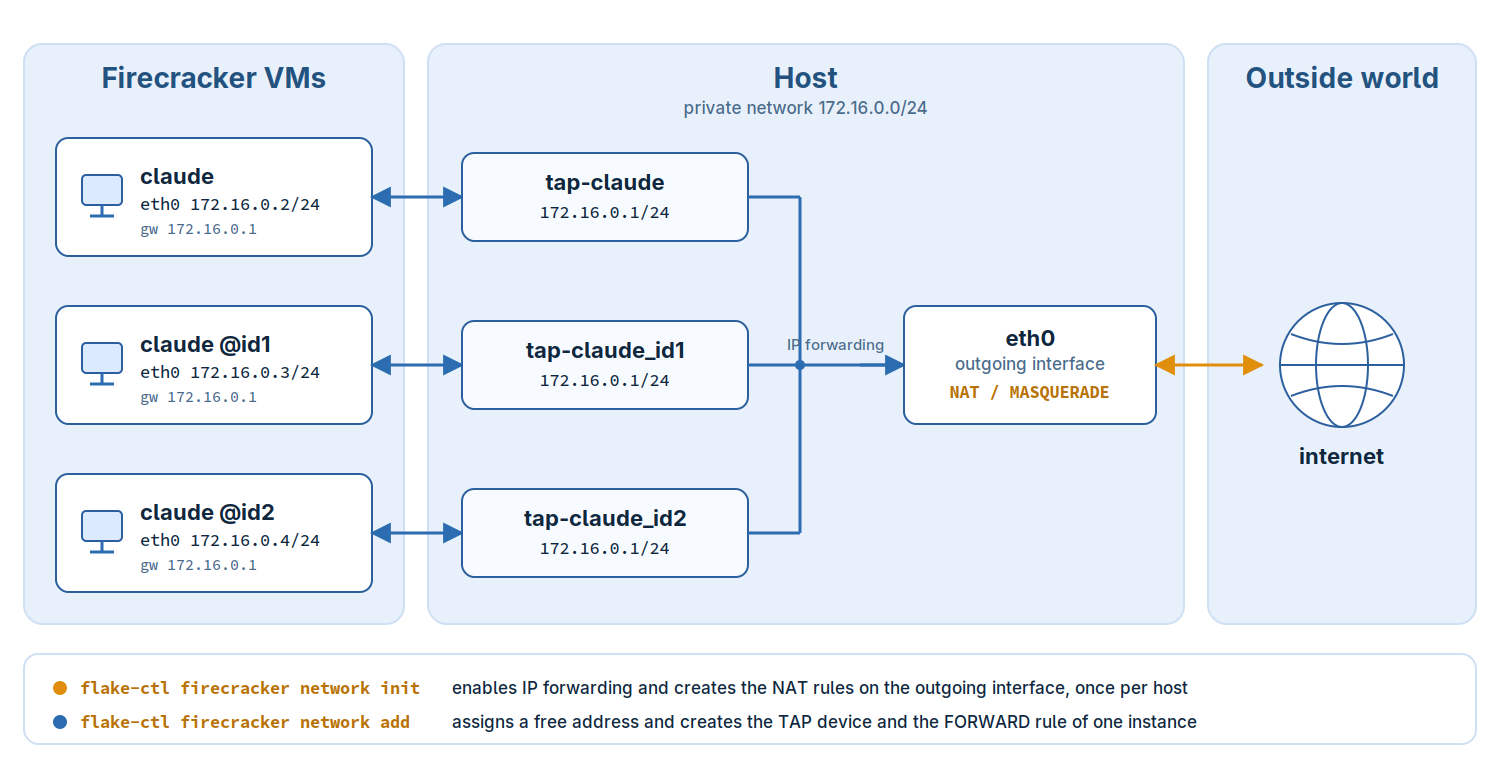
The traffic of an instance takes the following path:
The kernel of the VM configures
eth0statically from its commandline and routes everything to the gateway172.16.0.1, which is the host side of the TAP device the instance is connected toIP forwarding on the host passes the packet from the TAP device on to the outgoing interface. The firewall setup of the host allows this for traffic of the private network leaving through the outgoing interface only
The NAT rule rewrites the sender address of that traffic to the address of the outgoing interface. On the network of the host the traffic of the instance appears as if it would originate from the host itself
The answers are recognized by connection tracking and are routed back to the TAP device the connection came from. As all TAP devices carry the same gateway address, and with it the same route to the private network, a host route of the form
172.16.0.3/32 dev tap-1000_claudeper instance makes sure the packets are delivered to the device the instance is connected to
7.1.1. The Firewall Setup
All netfilter rules of the setup live in chains of their own,
FLAKE_PILOT_NAT, FLAKE_PILOT_FORWARD and FLAKE_PILOT_INPUT,
which are entered by one jump rule from the builtin chains each. They
only match the traffic of the private network and of the TAP devices,
the other traffic of the host is not affected. The setup isolates the
instances:
Traffic between two instances is dropped, also between two instances of the same user.
Traffic from the outside world to an instance is dropped. Only the answers to connections the instance opened pass back.
Traffic from an instance to another interface of the host than the outgoing interface is dropped.
Traffic from an instance to the host itself is dropped, except for the NFS service of the host, which the instance may reach through its gateway, and the DNS and DHCP service if the host runs them for the VMs. These services are allowed per instance, for the address and the TAP device of the instance only. NFS is allowed in version 4, which needs no other port, see Firecracker Volumes.
IPv6 is switched off on the TAP devices, the setup is IPv4 only.
man 8 flake-ctl-firecracker-network-init lists the rules.
Note
Only the address in the flake configuration and its allocation are persistent. IP forwarding, the firewall setup and the TAP devices are runtime state of the host, after a reboot they have to be created again. An application which is configured to use a network does not start if its TAP device or the firewall setup of the host is missing. The error message names the command which creates the missing part.
7.2. The Commands
7.2.1. Prepare the Host
flake-ctl firecracker network init
Selects the private network of the VMs, enables IP forwarding and
creates the firewall setup for the outgoing interface, the one the
traffic of the VMs leaves the host through. By default this is the
interface of the IPv4 default route of the host, another interface can
be specified with --outgoing-interface, e.g
--outgoing-interface eth0. This is done once per host, and again
after a reboot, not once per application. Network and interface are
recorded such that the following commands use the same network and
know where to route the traffic to. If IP forwarding was switched
off, the state file records that Flake Pilot switched it on.
By default the VMs use the public name server 8.8.8.8 and the DNS
port of the host is closed to them. If the host runs a resolver the
VMs should use instead, e.g to resolve names of the local network,
pass --host-resolver. The resolver has to answer queries on the
gateway address, e.g 172.16.0.1, which is not the case for most
default setups. dnsmasq can listen on it, systemd-resolved
with DNSStubListenerExtra=172.16.0.1. The applications connected
afterwards get the gateway as their name server and are allowed the
DNS port of the host.
Likewise the DHCP port of the host is closed to the VMs, they get a
static address and use no DHCP server. Pass --host-dhcp only if
the host runs a DHCP server for guests which are set up to request
their address by DHCP. The server has to hand out the address
allocated to the instance, the host route and the firewall rules of
the instance are bound to it.
A change of these settings takes effect for an application once it is connected again.
Rules of former versions of Flake Pilot for single TAP devices are
deleted. The rules for all traffic former versions created, a
MASQUERADE rule for the outgoing interface and a FORWARD rule
for all answers, cannot be told apart from rules created by other
means and are only reported along with the command to delete them.
TAP devices of former versions are named without the ID of the user,
they are not used anymore and stay until the next reboot or until they
are deleted by hand.
Warning
Please check which tool is managing the firewall on your host and refer to its documentation on how to set up the NAT/postrouting rules. The command assumes there is no other firewall software active on your host and serves only as an example setup!
7.2.2. Connect an Application
flake-ctl firecracker network add --app $HOME/bin/claude
Allocates a free address to the application, writes the network setup
to its flake configuration, creates its TAP device for the calling
user, makes the device the gateway of the application, routes the
address of the application to it and allows the application the NFS
service of the host, its DNS service with --host-resolver and its
DHCP service with --host-dhcp. The command requires the firewall setup of
init to be active.
As every instance needs its own address and its own TAP device, the command has to be called for each selector the application is called with:
flake-ctl firecracker network add --app $HOME/bin/claude --instance @id1
A system wide flake is set up by root and run by other users. Its TAP
device has to belong to the user who runs it, root names that user
with --user. The address of an instance is part of the flake
configuration, the same instance can therefore only be connected for
one user. Give every user an instance of their own:
# run as root
flake-ctl firecracker network add --app /usr/bin/claude \
    --instance @tux --user tux
7.2.3. Disconnect an Application
flake-ctl firecracker network remove --app $HOME/bin/claude
Deletes the firewall rules of the application, its TAP device, the
network setup in its flake configuration and the allocation of its
address. The address becomes free for another application. Called
with --instance only the setup of that instance is deleted, with
--user the setup created for that user. The host setup of the
init command is shared by all applications and stays in place.
Note
The application is left without an ip= option, which is the
same state a fresh registration creates. If
the VM should fall back to a dynamic setup, ip=dhcp has to be
added to its boot_args by hand.
7.2.4. Delete the Host Setup
flake-ctl firecracker network cleanup
Deletes the TAP devices of all connected applications, the firewall
setup and switches IP forwarding off again if init switched it on.
The address allocations and the flake configurations are kept, the
host is left in the state it has after a reboot. Calling init and
add again connects the applications with the addresses they had
before.
All commands change the network configuration of the host. The
changes are made by the helper, see Privileges and Trust, which is
called through sudo. It checks every argument again and only
ever creates addresses, routes and rules within the network recorded
by init. The commands can be called more than once: a device, a
route, a rule or a chain which is already there is not created twice,
and one which is gone is not deleted again. After a
reboot of the host, calling init and add again restores the
setup with the same addresses.
7.3. The Result in the Flake Configuration
The flake configuration for the registered claude app from
Claude AI as a Firecracker VM App can be found at:
vi ~/.config/flakes/claude.yaml
Connecting the app and its instances leads to the following network
related settings. The addresses are the ones of the preferred
network, on a host which uses 172.16.0.0/24 already the
addresses of the selected network show up instead:
vm:
  runtime:
    firecracker:
      boot_args:
        - ip=172.16.0.2::172.16.0.1:255.255.255.0::eth0:off
        - rd.route=172.16.0.1/24::eth0
        - nameserver=8.8.8.8
      instance:
        "@id1":
          boot_args:
            - ip=172.16.0.3::172.16.0.1:255.255.255.0::eth0:off
        "@id2":
          boot_args:
            - ip=172.16.0.4::172.16.0.1:255.255.255.0::eth0:off
With this setup claude boots with the static IP 172.16.0.2,
claude @id1 with 172.16.0.3 and claude @id2 with 172.16.0.4.
For further information about the network setup options, refer to
man dracut.cmdline and look up the section about ip=.
The instance settings do not replace the global boot_args but are
merged into them: an option which is also set in the instance
section takes the place of the global setting of the same option,
options which are not set globally are appended. In the example above
only the ip= option is exchanged, rd.route= and
nameserver= stay in effect for all instances.
Note
The @ character is reserved in YAML, therefore the key has to
be quoted. For convenience the plain name without the @
prefix, e.g id1, is accepted as a key as well. Run the app
with PILOT_DEBUG=1 to see whether an instance section was
found and which kernel commandline it produced.
Note
The kernel only accepts interface names shorter than 16 characters
which do not contain /, : or whitespace. Thus the TAP
device name is built by replacing all characters outside of
[A-Za-z0-9_] by _ and by shortening names that are too
long. A shortened name keeps the first characters of the app name
and is made unique again by a hash suffix, e.g the app
some-very-long-application-name uses the TAP device
tap-some_bbb9de. Run the app with PILOT_DEBUG=1 to see the
TAP device name it expects.